
Technical
AirPods drift by tens of milliseconds over five minutes. Here's how I measured it.
Why a metronome app can feel perfectly in time for a minute and then slowly wrong on AirPods, what the numbers say about other headphones and speakers, and how RhythmForge corrects it while you play.
RhythmForge listens to you play and tells you, beat by beat, how far you were from the click. That only works if the app knows when you actually heard the click. Get that wrong by 20 milliseconds and a perfectly placed stroke gets marked late.
Early in testing, sessions on AirPods had a strange shape. The first minute looked fine. By minute four, my hits were sliding away from the click on the chart, steadily: strokes that landed Perfect in the first minute were landing Okay or Weak by the fifth, even though nothing about my playing had changed. On the phone speaker, the same drill stayed flat.
So I measured it.
The short version, if you practice on AirPods:
- You're fine. RhythmForge corrects the drift while you play.
- Calibrate once (Settings → Timing Calibration), so the first few beats are right too.
- Recording, an audition, or checking whether you push: use wired headphones or the phone speaker. Why is below.
What drift does to your strokes
20 or 30 milliseconds sounds like nothing. At 120 BPM, 16th notes are 125 ms apart, so 30 ms is a quarter of a 16th: about the gap between the two notes of a wide flam. RhythmForge counts a hit as Perfect within 10 ms of the click, around the point where most listeners stop hearing a difference.
On most outputs, the delay between the phone and your ear is fixed, so the moment you heard the click is easy to know. On AirPods, the delay slides by tens of milliseconds over the first minutes. Your strokes stay where they were; the click moves under them.
The numbers
I measured four outputs on two iPhones, a 16 and an XS, two ways:
- Me playing: steady quarter notes on a pad, five minutes a session.
- The click alone: no drummer at all. One AirPod (or the speaker, or the headphones) held to the phone's mic, a test build playing the click far louder than the app allows, and the app scoring its own click for ten minutes.
Drift is how far the timing moved over the first five minutes.
| Output | Drift, 5 min me playing | Drift, 5 min the click alone |
|---|---|---|
| AirPods | 45–60 ms 3 sessions | 24–31 ms both phones |
| Bluetooth speaker (UE BOOM) | 3.6–8.4 ms 3 sessions | under 1 ms |
| Built-in speaker | 3.3–6.4 ms 3 sessions | under 1 ms both phones |
| Wired headphones | 3.8–5.0 ms 2 sessions | under 1 ms |
The played sessions run higher: my own timing is in every one of those numbers, and drift varies from run to run. The pattern is the same both ways. AirPods move by tens of milliseconds; everything else stays well inside the Perfect window.
iPhone 16iPhone XSPhone speaker
On the iPhone 16, the click came back on time in the first minute and 41 ms early by the tenth; on the XS, 32 ms early. Both moved fastest at the start. Beside them, the phone speaker is a flat line: on the speaker, the wired headphones and the UE BOOM, every click scored Perfect.
On the AirPods runs the app, which had no idea nobody was playing, told the click to "Slow down and aim for the center of each beat."
That rules out the easy suspects. Both phones drift, so it isn't the phone. The UE BOOM is Bluetooth too and doesn't move, so it isn't Bluetooth. What's left is inside the AirPods: something in how they buffer audio shifts during a session, and no app can see it happen. iOS does report a delay for AirPods, about 163 ms, but that number stays the same all session while the real delay slides by tens of milliseconds.
How the fix works
You already know the trick. Play a big stage with a laggy monitor and after a few bars you stop hearing the delay: everything sounds the same amount late, so you shift to it. You don't chase every note. You follow the part that's steady.
On AirPods, RhythmForge does the same. If your strokes keep landing early by about the same amount, it slowly moves its idea of "when you heard the click" toward them. Each stroke nudges it by 3% of how far off it was, so one stray hit barely counts and a steady pattern wins: at 80 BPM, half of any gap closes in about 17 seconds, faster than the AirPods drift. Strokes more than 60 ms off (a miss, a ghost note, a flam) are ignored. What it learns is kept: your next practice session or challenge on the same AirPods starts already corrected.
Correction offCorrection on
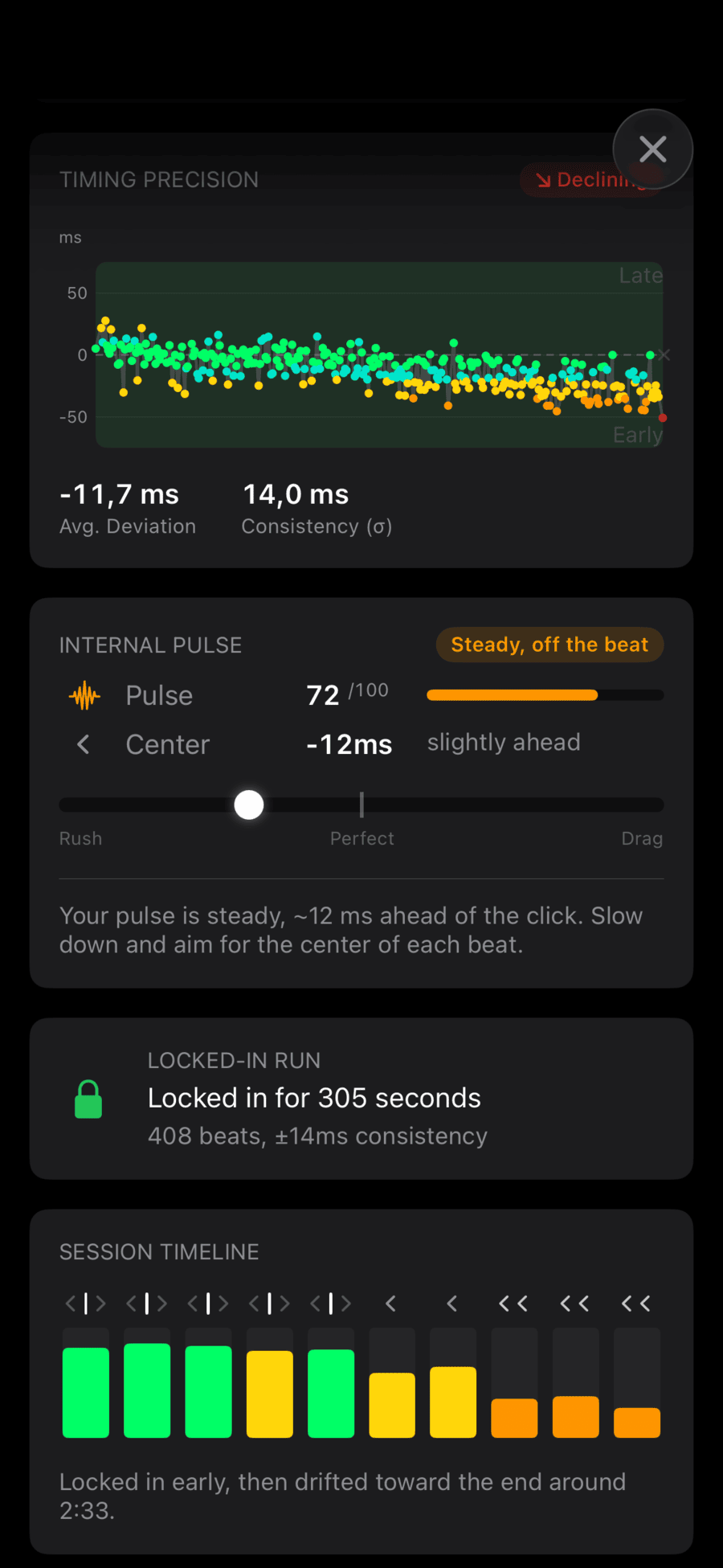
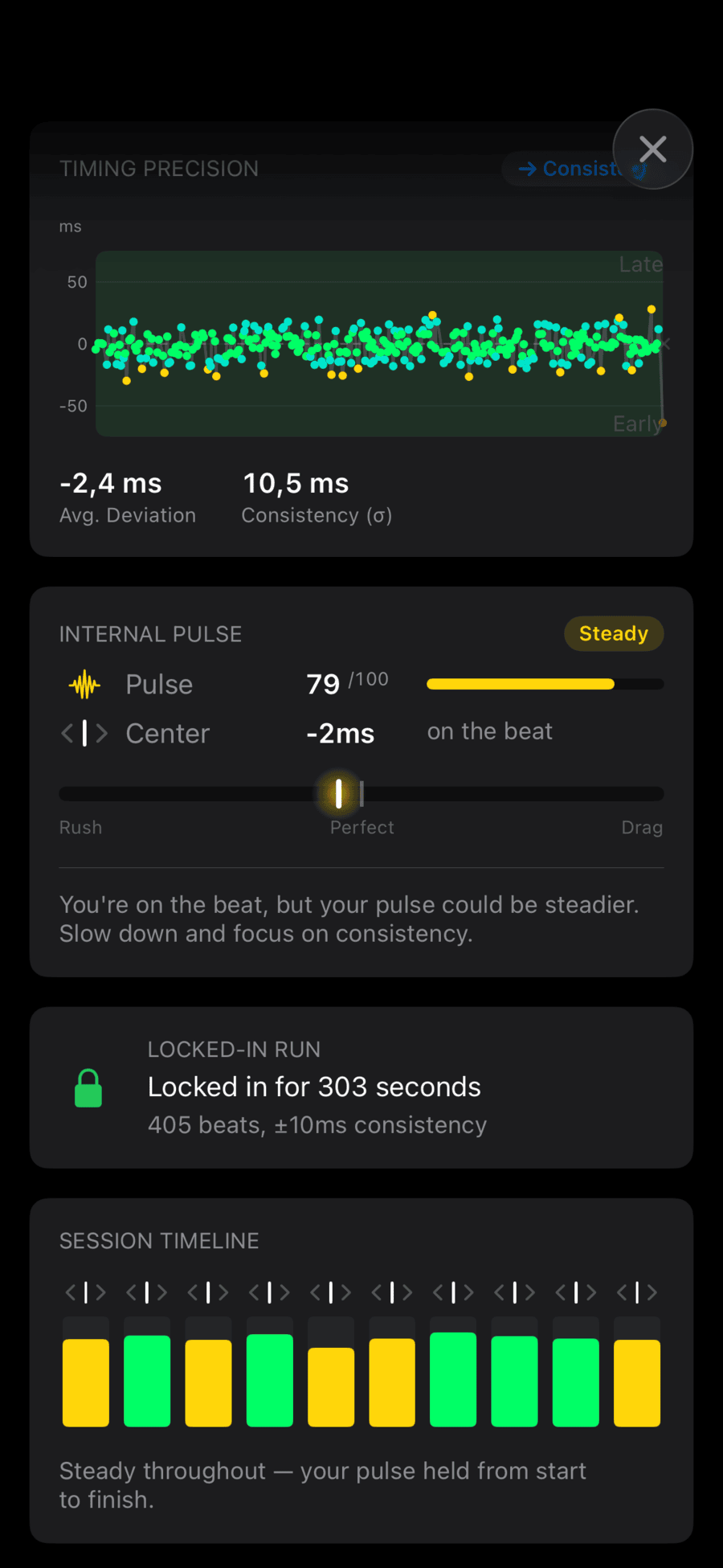
Same AirPods, same drill, five minutes each. With the correction off, my average slid from +5 ms to −26 ms, accuracy was 63%, and the app read the slide as mine: "Locked in early, then drifted toward the end around 2:33." With it on, the average stayed within 5 ms of the click the whole time, accuracy was 80%, and the timeline said "Steady throughout."

The catch: a steady push looks like drift
On AirPods, the app can't tell a steady push from drift. If you rush every stroke by the same 15 ms, the correction treats it like drift and absorbs half of it in under 20 seconds. What stays visible is everything that moves: how consistent your strokes are, a fill that pushes, a bar that drags.
That's why the correction runs only on AirPods. On a speaker or wired headphones the delay doesn't move, so a steady offset there really is you, and the app shows it. Correcting everywhere would hide the one thing the app exists to measure. Today the correction recognises anything with "AirPods" in its name (a renamed pair won't be recognised); other headphones join the list once I've measured them, not before.
So for the honest answer to "do I rush?", check on wired headphones or the phone speaker.
The first few beats
The correction needs 10–15 strokes to catch up, so on freshly connected AirPods the first beats can read 20–38 ms late. Calibration fixes that. The first time you connect AirPods the app offers it, and it's always in Settings → Timing Calibration, two ways:
- Automatic, the more accurate one: take one AirPod out, turn the volume all the way up and hold the pod next to the phone's microphone. The app plays the click and measures how late it comes back.
- Play-along, if the mic can't hear the pod: play along with the click for about ten seconds. It works on any output.
Each output keeps its own value, and the app switches when you change headphones.
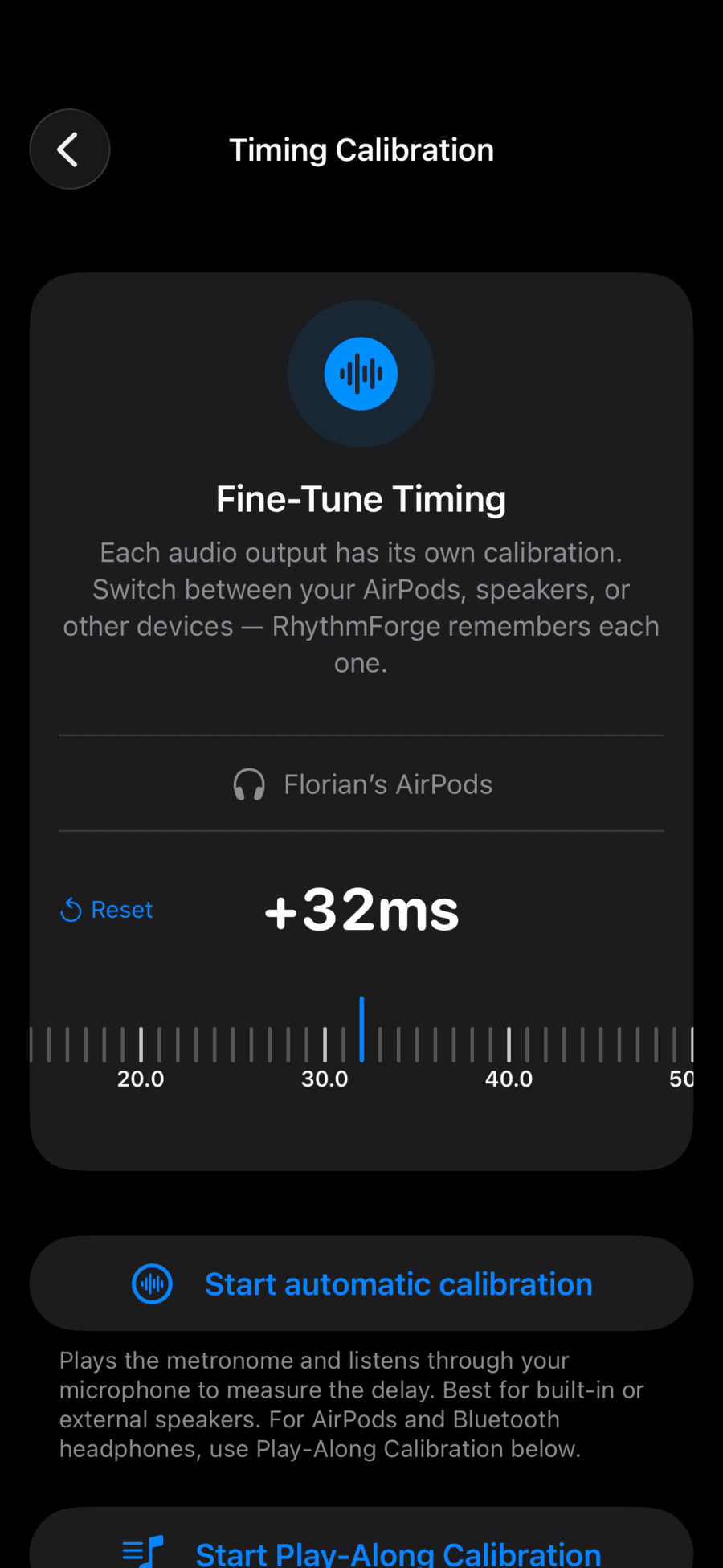
Calibration sets the starting point. The correction follows the drift.
I'd rather fix a problem than write a warning about it. "AirPods may be inaccurate, use wired headphones" would have been easier to ship, and it would have told most iPhone drummers that the app doesn't work with what's already in their ears.